
Get support
Concepts

Key concepts & terminology

This app uses four words that sound interchangeable and are not: part, component, file, and part change. Getting them straight is most of the learning curve, because every guide, every tab, and every status depends on the distinction.

The record types

Product
Something you develop, for internal or external use. It names the Jira space its development happens in, its classification, the checklists that apply to it, and the people who review its phase gates.
BOM
A bill of materials: the structured, hierarchical list of everything that makes up one product configuration. A product can have several, for variants, accessories, documentation, or software.
Part
An item inside a bill of materials. A part is a position in the structure, and what actually fills that position is a component, a file, or another product.
Component
An off-the-shelf item you buy: a resistor, a fastener, a cable, a purchased sub-assembly.
File
A custom item you have made to your own design, rather than buying it off the shelf.
Part change
A version of a bill of materials or of a part. Always linked to an engineering change for approval, and the only route by which anything becomes usable in manufacturing.
Checklist
The set of questions a product must answer to enter a lifecycle phase. Linked to one product, and made of checklist items.
Checklist item
One question, answered with a document version from Document Control and a summary of what that document says.
Part against component and file

A part is where something sits in this product. A component or file is what that thing is, independent of any product. The same component can fill a part in twenty different bills of materials, which is why it is created once and referenced rather than retyped each time.

Why the part change exists

A bill of materials and a part are both containers. Neither one carries a version. The part change does, and it is what an engineering change approves. That indirection is what lets a bill of materials stay a single stable record while the versions underneath it are drafted, reviewed, released, and superseded.

It follows that a bill of materials is only as released as its part changes. One with nothing approved beneath it has never been through change control, whatever its description says.
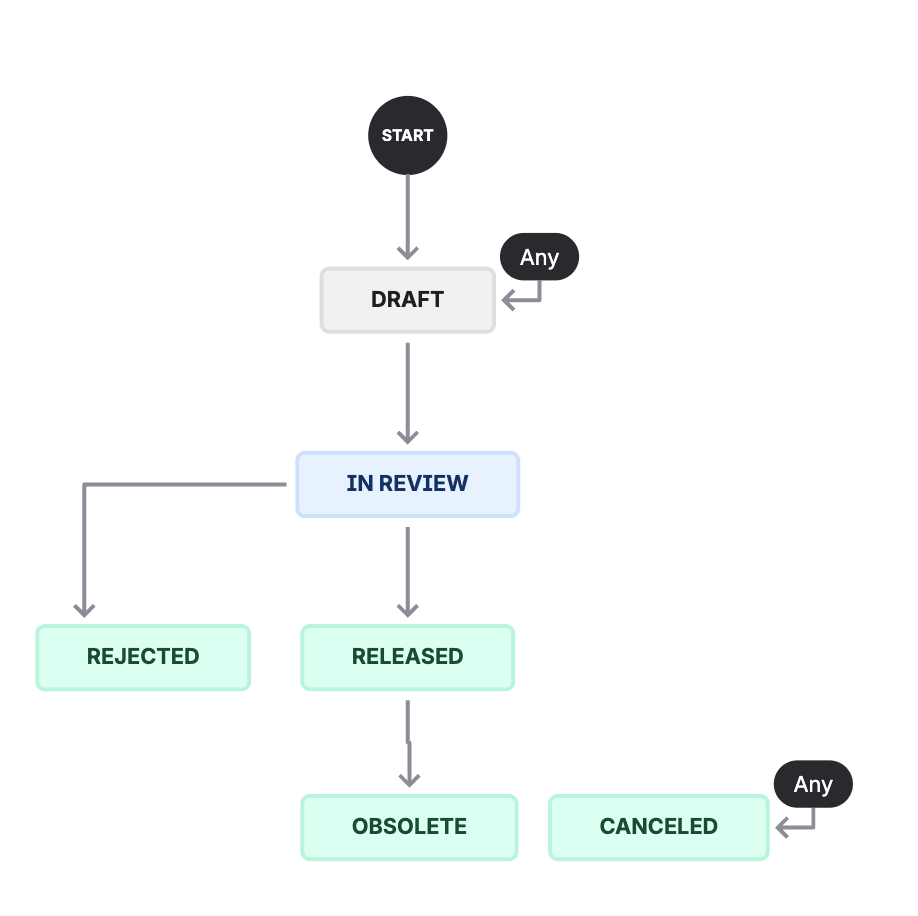
The part change workflow: from Draft to In Review, then either Rejected or Released, with Released going on to Obsolete. Draft can be reached from any status, and so can Canceled.
DRAFTBeing written. Not approved for use.
IN REVIEWLinked to an engineering change and out for approval through change control.
RELEASEDApproved through change control. This is the version manufacturing can use.
REJECTEDTurned down at change control.
CANCELEDAbandoned, because it will not be used.
OBSOLETESuperseded or retired by a later change control approval.

Leave canceled and rejected part changes in the bill of materials tree. They are the evidence that a change control process is actually governing the structure, and their comments and history are what demonstrate it. Deleting them removes the proof that anything was ever refused.

The statuses a bill of materials or a part moves through

DRAFTCreated, with nothing approved beneath it yet.
ACTIVEAt least one part change under it has been released through change control.
INACTIVEEvery part change under it has become obsolete, so there is no approved version left.

The statuses a component or file moves through

DRAFTCreated, and its information is still incomplete. Not approved for use in any bill of materials.
IN REVIEWComplete, but not yet approved by an engineering change, or still going through one.
ACTIVEApproved at least once for use inside a bill of materials.
DISCOURAGEDStill approved, but end of life or being phased out. Usable, and not for a new design.
R&D ONLYApproved for research and development work only, not for a product that ships.
REJECTEDTurned down while in draft or review.
OBSOLETENo longer usable, and no bill of materials is still using it.

The lifecycle phases

A product moves through eight phases, each with its own objectives, its own deliverables, and a formal phase review before it is allowed to go further. The point of the structure is that a product is never advanced further than the maturity of its data justifies.

PhaseWhat it establishes
IdentificationThe idea, and whether it is worth exploring. Everything here is preliminary and expected to change.
ConceptIntended use, user needs, and regulatory classification, still exploratory.
RealizationThe design itself. Deliverables exist but are not final, and the bill of materials is deliberately incomplete.
PilotThe design built for real, at small scale, with manufacturing and supply data taking shape.
EvaluationVerification and validation evidence, confirming the design does what it was meant to.
CommercialMarket release. Everything required is complete, consistent, traceable, and revision controlled.
Phase-outWithdrawal from the market, managed rather than abandoned.
DiscontinuedThe terminal state. The record is formally and permanently closed and the product is no longer supplied.
Why the same questions come back

Checklist items repeat across phases with only a small change of wording, from "is this available" early on to "is this still up to date" later. That is deliberate. Intended use, standards, classification, architecture, and risk analysis can all change during development, and the gate exists to force each change to be re-confirmed and its downstream impact assessed rather than assumed still valid.

The two roles

Product Data Administrator
Administers product data and the space it lives in. Can install and reconfigure the space, manage schemes, delete work items, and bypass transition conditions.
Procurement Engineer
Sources, evaluates, qualifies, and procures the components and files that go into bills of materials, and keeps their supplier, purchasing, and technical information complete. Process owner for the Components space.

Assigning these to people is covered in Set up Product Lifecycle Management.